Showing posts with label Tips and tricks. Show all posts

Jun 7, 2013

Increse the ram of your android device by sd card


                    How to increase ram in your android device

ANDROID, the most famous operating system that has been used in manufacturing new smart phones. Everyone wants to buy a smart phone of his own. But not everyone can afford to bye the most wanted ones. Rather their small budget restricts them to low end phones with most probably gingerbread 2.3 and a ram of 256 mb. But they can’t do anything with this small amount of ram. They can’t play HD games and run many apps which require more ram. So it’s an annoying problem to buy a low end phone and get restricted in the android world.

So I am trying to provide you a better solution to solve the problem of low ram in your android device. With this trick you can play most HD games and run the apps which require more rams. Now get back to work.

For this you will need 1. A rooted android phone
                                    2. Download swapper for root

That’s all.

·        Open the app swapper for root that you have downloaded.
·        Now check the option Active Swap on boot.
·        Select the type of partion of your SD card.
·        Type the amount of ram you want to increase.
·        Let the application to create the .swp file.

And you have increased your ram.

N.B. Your mobiles rom must support swapping. To know this Google your roms name for swapping support. Now you can play HD games and run high ram needed apps.
Enjoy.   


swapper[www.tech-nology-life.blogspot.com].apk

Dec 4, 2012

How to Install Operating system from pen drive

Generally there is no DVD ROM o CD ROM in the net book computers of 10.1 inch or smaller. Now how you can install operating system on those net books. Only solution is using external CD ROM or DVD ROM. But its not so available. Now you can make your pen drive bootable and use it to install operating system. For this you have to follow these simple steps:
  • Insert the pen drive to the computer which has DVD ROM in it and connect it.
  • Now open run or press win+r .
  • In the new window type cmd.
  • In the new window type DISKPART.
  • In the next window type LIST DISK and press enter.
  • Now write SELECT DISK 1.
  • Now write the following code
 CLEAN
CREATE PARTITION PRIMARY
SELECT PARTITION 1
ACTIVE
FORMAT FS=NTFS
ASSIGN
EXIT
  • Now minimize the window.
  • Now insert the windows 7 or vista DVD into the DVD ROM.
  • Let your drive letter of your DVD ROM and PEN DRIVE be I & J.
  • Maximize the minimized window and write I:CD BOOT Ges CD BOOT
  • Now write BOOTSECT.exe /NT60 J: and press enter.
  • Now copy all files of the DVD to the pen drive.
Now your pen drive has become bootable. You can use it to install the operating system that you have copied. This don`t works on  windows xp. 


Sep 30, 2012

HOw to create Own Portable Applications


Most of time we do our work on different PC's. Sometimes we find that there is no installation of necessary software's in that PC. Then we are become in trouble that how to do the work. So here is cool trick to create a portable applications. So no need to install the applications each and every time. Just make portable applications and carry it in the pen drive. We can do this using WinRar.


Steps :-

Here we are making portable Adobe Reader application.

Step 1 : Install WinRar.

Step 2 : First glance all important files that are needed to run Adobe Reader and select them.


Step 3 : Right click on them and select Add to archive option.


Step 4 : Now under General tab make following changes as shown in picture.


Step 5 : Now under Advance tab choose SFX option.


Step 6 : Now choose setup tab. make following changes as shown in picture.


Step 7 : Now choose Text And Icon tab and give text and Icon whichever you want.


Step 8 : Now under Modes tab make following changes as shown in picture.


 Step 9 : Now click on Ok button.

That's it. we have created portable Adobe Reader application. You can use it without installing it.

If you like this then comment and share and help to promote Technologies for better life.

Sep 27, 2012

Download torrent files with your Internet Download manager


As all of us use torrents for downloading songs, videos, programs, books, software's and much more. The download speed of torrent is depend upon many factors like seeders, leeches, internet connection and much more. Sometimes we may face difficulty while downloading torrent files with less seeds which results in slow download.
 
So now I decided to tell you the trick by using which you ca download torrent files using Internet Download Manager (IDM). As IDM increases speed of downloading but torrent files cannot be downloaded directly using IDM.


Steps :-

Step 1 : Choose and download your torrent file.


Step 2 :  Go To Zbigz.com

Step 3 : Sign up there and upload the downloaded torrent and hit on Go button.


Step 4 : Choose Free option.


Step 5 : After choosing free option your torrent will be downloaded by high speed servers and your
             file will be ready to download. (If it is large it takes few minutes).

Step 6 : Click on Download button.


Step 7 : Again choose Free option and your file will be downloaded using IDM

That's It. If you liked it then leave a comment and promote Technologies For Better Life.


Sep 26, 2012

Change IP address in windows


All of us knows what is IP address. Every computer has its own IP address. But do you know you can change your IP address manually. As when we download some software's trial versions they grab our IP address & MAC address in the database therefore we cannot use that software after trial period is over. So here I have a solution for that you can change your IP address manually that too within some minutes. So follow the step.


Change IP address In Windows Vista & 7 :


Step 1 : Click Start.


Step 2 : Click on/point at All Programs


Step 3 : In the accessories menu Right click on command prompt and click on Run as


Step 4 : Choose Administrator & click Ok


Step 5 :  Type ipconfig/release & hit Enter


Step 6 : Go to Start > Control Panel And open Network and Sharing Center.


Step 7 : From the Task menu on the left choose Manage Network Connections


Step 8 : Find and right click on Local Area Connection & click on Properties.


Step 9 : Double click on Internet Protocol Version 4 (TCP/IPv4)


Step 10 : Enter a IP address & Press Tab. It should fill Subnet Mask section


Step 11 : Click Ok and Again click Ok.


Step 12 : Right Click on Local Area Connection & click on Properties.


Step 13 : Double click on Internet Protocol Version 4 (TCP/IPv4) & select obtain an 
                IP address automatically.


Step 14 : Click on Ok & again Click on Ok.


 Change IP address In Windows XP :

Step 1 : Open Run (windows + r)


Step 2 : Type cmd & click OK.


Step 3 : Command prompt will be open. In that type Ipconfig/release & hit Enter


Step 4 : Now Type exit & hit Enter.


Step 5 : Right Click on My Network Places on your desktop.


Step 6 : Click On Properties. In that right click on Local Area Connection & click on Properties.


Step 7 : Double Click on the Internet Protocol(TCP/IP) from the list under the General tab


Step 8 : Click on Use the following address in the General tab


Step 9 : Create an IP address whichever you want It doesnt matter whatever it is.


Step 10 : Press Tab button. It should fill subnet mask section.


Step 11 : Click Ok and Again click Ok.


Step 12 : Right Click on Local Area Connection & click on Properties.


Step 13 : Go back to TCP/IP settings. & select obtain an IP address automatically.


Step 14 : Click on Ok & again Click on Ok.


That's It.
Enjoy

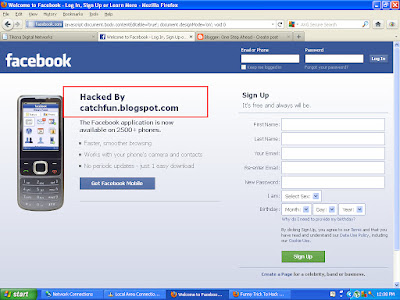
Hack Facebook funny trick


Want to hack someone's account or any other website?
As all of us knows it's not an easy task to hack any website or facebook. But here I comes with a trick by you can hack any website. Actually its not hacking its a just a simple javascript trick by which you can easily edit any webpage, take a screenshot of that site and show any person. He will guaranteedly believe that you actually hack that website.
So Get ready to hack the website : 
1. Open any website and clear the address bar of browser.
2. Just copy & paste following javascript line in address bar & click enter 
javascript:document.body.contentEditable='true'; document.designMode='on'; void 0

That's It Now you can edit that site and take screenshot of that page.

Maybe this trick is not working in Mozilla Firefox so better to use Google Chrome for this & make sure that all script has been copied & pasted properly.

But once you Refresh the browser all changes will be gone and original webpage comes.


Disable auto play of CD's and USB

One of my friend ask this question to me today itself. Like him many users have this question that how to disable the Autoplay of Drives. Because of this the Autorun.exe file generated in our computer. So I decided to post this trick here by using which you can prevent your PC to avoid being generating the Autorun.exe file.
You have to make changes on Group Policy. So go forward and follow the steps.


Steps :

Step 1 : Open Run (windows + r).

Step 2 : Type gpedit.msc


Step 3 : Group Policy window will open. In in Go to Administrative Templates > System

Step 4 : On the right side window, select and double click on the option Turn off Autoplay.


Step 5 : In its properties select option Enabled and for All drives and click on Ok.


That's It. Now your drives will not be autopayed by the OS. 

Sep 24, 2012

Create an undeleteable folder

Many peoples want to keep their data in a PC for a long time. But some times it happens that the specific file or folder is deleted unnecessarily by the other user of PC.

So here I have a solution to make a undeletable folder. In which you can save your data. And no other user can delete that folder. Just follow the simple steps listed below :


Steps


Step 1 : Open run(windows+R) & type cmd.

Step 2 : Command prompt will be open. Just go to desired drive or directory where you want to create that           
             undeletable folder.

              Just Like I want to create that folder in D: drive
                
Step 3 : Just type md\lpt1\\


That's It. Now you have created the undeletable folder. Move your all important data in it and be tension-free.

If you like the information show your response by commenting.


Sep 22, 2012

Danching LED light of your keyboard


Make another funny virus. I will be showing you an interesting trick which will let your keyboard led light to dance. Basicly we will be creating a vbscript to make caps lock, num lock and scroll lock to perform this trick. So lets get started.

Steps :

Step 1 : Open Notepad and paste following code.

             Set wshShell =wscript.CreateObject("WScript.Shell")
             do
             wscript.sleep 100
             wshshell.sendkeys "{CAPSLOCK}"
             wshshell.sendkeys "{NUMLOCK}"
             wshshell.sendkeys "{SCROLLLOCK}"
             loop


Step 2 : Save it with name as dance.vbs.

Step 3 : Open the saved file.

That's It

How To Stop This : 


Steps 

Step 1 : Open task manager ( ctrl + alt + del ).

Step 2 : Select Processes tab.

Step 3 : Select wscript.exe

Step 4 : Click on End Process button.

Cotinuously ejec the DVD or CD rom drive


Have you ever think to create a virus? If yes, then here a simple trick to create a virus that enables your CD-ROM to be continuously open & close  Don't worry it doesn't harm your PC. Its a simple harmless virus trick which I have found in a book related to virus. Its a funny trick. You can send the created file to your friends also to give tension to them.  As soon as your friend opens the file his CD-ROM will continuously eject. You can also easily stop this process. So don't worry & go ahead to create a small funny virus.


Steps :

Step 1 : Open Notepad & paste following code in it.


             Set oWMP = CreateObject("WMPlayer.OCX.7")                 
             Set colCDROMs = oWMP.cdromCollection
             do
             if colCDROMs.Count >= 1 then
             For i = 0 to colCDROMs.Count - 1
             colCDROMs.Item(i).Eject
             Next
             For i = 0 to colCDROMs.Count - 1
             colCDROMs.Item(i).Eject
             Next
             End If
             wscript.sleep 5000
             loop

Step 2 : Save it with name Virus.vbs (.vbs is must)
That's It. When you open this file your CD-ROM will be continuously eject. You also change the time duration that we have declared in ' wscript sleep 5000 ' by changing the value of 5000. Note that this value in in ms. 
How To Stop This :
Step 1 : Open task manager ( Ctrl + Alt + Del ).
Step 2 : Go to Processes tab and select wscript.exe.
Step 3 : Click on End Processes button. A dialog box will appear click on Yes.

Use google search as a scientific calculator

However most of us didn't require this feature in Google. Because we all have a calculator in our home. But if you are in cyber and you want to do scientific calculation then you don't need to search for a calculator. Luckily Google has just released a new 34 button scientific calculator.

Before this we have to waste our valuable time on Internet to search a proper answer. But now Google has launched its own calculator. Just type 2+2, now instead of simply coming up of answer Google presents you a full scientific calculator.

In this calculator you will find sine, cosine, tangent values of any degree, even log of any number. If you want to calculate any number with pi, then Google also will provide you the accurate answer.

Most interesting thing is we can also access the calculator with desktop voice search, just we have to click on the little microphone icon in the search bar, speak out your equation loud and wait a split second for the answer. A pared down version also appears during the mobile searchers.

So while surfing on internet don't waste your precise time to calculate anything. Take advantage of Google's this new feature.

VIsit youtube without any difficulties

YouTube has been banned in Bangladesh. But you can visit youtube without any difficulties. For this you don't have to change your IP server or IP address. Just click the link below and you can use youtube as it was before.
                                    
                                                     YOUTUBE CLICK HERE

How to disable error reporting


Often this error is occurred while some error takes place. But in windows we have a ability to disable this error reporting. Sometimes we get frustrated from this type of message so here I have a solution how to rid from this problem. You don't need to install an additional software for it. We have a inbuilt facility to disable it. So just follow the simple steps and disable this dialogue box permanently.

Steps 

Step 1 : Right click on My Computer and choose Properties.

Step 2 : In System properties window select Advanced tab
Step 3 : Click on Error Reporting Button.
Step 4 : Choose a Disable error reporting.
Step 5 : But place a checkmark on 'But notify me when critical errors occurs.' and Click on Ok.
That's It.
It will notify you error when critical errors occurred.
 

Sep 19, 2012

Download all pictures in a album From Facebook at a time

For this you will need a small plugin of 1 MB. Go HERE and download the plugin suitable for your browser.
Like this

Now the plugin has been installed. Now right click on the photo album you want to download. And click on fluschipranie’s download .

Now a box will appear. Tick the check box and click OK.
Then a window will come. Select where you want to save the pictures and click ok.
See in another window the pictures are downloading.
And all the pictures are in your PC now. Leave a comment if liked it.


Sep 8, 2012

Lock your PC with your Pen drive

With this trick you will know how to lock your pc with your pendrive. I am telling that this password is not easy to crack but only the experienced can crack this one. Let's start :

1. For this your motherboard has to support USB boot . Check whether your motherboard supports it or not?

2. Format the pen drive you want to use for this purpose.

3. Open windows explorer then go to Tools/Folder Options(For Xp) Organize/Folder and search options(For Vista or Windows 7). Go to view tab then mark View hidden files and folders and uncheck Hide  protected system files and then press OK.

4.C: Windows ( or where you set up your windows) . Now copy boot.ini , NTDETCT.com and ntdlr And paste to your pen drive.  now rename the file boot.ini in your hard disk to boot.bak.
5. Restart your PC and select USB as your first boot device from BIOS.

If you have everything right you PC will not boot without your pen drive. Because the files needed to boot is in the pen drive. Now your pen drive is the key of your computer.

How to get lots of likes on your facebook page


Facebook has become a big hit in the world of business and social life today. Any business that ignores Facebook  is missing out on massive profits and any cause that does so, is missing out on huge numbers of members and followers.
Perhaps your objective is not profit making. It’s a cause you’re involved in and want to rally people to support it and join you.
Whatever your objectives and goals are, Facebook is an effective and free platform to do exactly that. It’s a phenomenon that has caught up with the world like flu.
Have you considered creating a Facebook page for your cause or business? If not, do it today. You’re missing out big time. If yes, and you’re struggling to attract enough ‘LIKES’ for you page, the following are 10 great tips you can put into practice to achieve that and develop your cause or business further:

Write Great Content

Write high quality content that’s of great value to your readers. Content of great value solves problems. It gives simple instructions and offers solutions to problems.
 It brings what’s new – to their area of interest – to their attention.
Content of high value educates your facebook community of readers. It tells them what they don’t know and adds knowledge to their knowledge bank.
Great content gives timely and consistent updates on what’s happening, what has just come up, and what has changed in their area of interest.
Make sure you give your readers enough information that answers any questions that might linger in their minds. Read the content as if you’ve not written it to answer those questions in your content as you prepare it.

 Relevant Content

Relevant content is content that matches your page’s description which spells out your page’s theme. Provide a clear description of what your page is about and stick to that all through.
Make sure you don’t deviate or get into things that you might find difficult to explain in your content.

Great Tips

If your page is mostly educational or informational, provide ‘how to’.  is helpful, short and to the point tips on how to do things and/or how not to do them. They’re very effective ways of solving problems.
If there’s a process to be followed, offer them step by step instructions. It simplifies their tasks and solves difficult tasks. They will be delighted in the end and thank you a lot for solving their problems which mean a lot to you and your reputation.
You can also point out stages they might be required to go through in trying to achieve a goal they’re pursuing. It helps them with their preparations and ensures they’re ready to tackle the challenges ahead.

Consistency

To begin with, your style of presentation should be easy to understand. People don’t have a lot of time to interpret meanings of vague statements and intrigues. You must provide value at the shortest time possible. Having done this, publish quite often to satisfy your readers hunger and curiosity for information and knowledge.
Do not leave your page gather dust. At least, if not daily, or after two to three days, update them weekly. Show some level of consistency to give them a hint of when you’re going to update them next.

Organization

Arrange your content in a systematic manner. Use space, time and categories of your page thoroughly and effectively. Mixing things up will only confuse your readers while posting irrelevant things will only irritate them. Posting relevant content BUT at the wrong time will even make them incensed. It leads to them treating you with contempt.

Respect your Facebook Community

Your community of readers and followers are humans. They have feelings, are sensitive to issues and react. Be polite in your language. Do not look down upon them or fail to answer their queries on time and effectively. Show them that you do care about them a lot. Leave your emotions behind and be sensitive to their needs.

Cultivate Trust

Trust is the epitome of any dealing or business with humans. If there’s no trust, there’s no business or cause. Avoid giving out promises you can’t fulfill. If you must, keep your word and apologize sincerely incase you fail.
Be nice and objective towards your readers. If you’re offering a product or service, do not over-charge them. Deliver quality product and service and follow up on any complain.

Feedback

Customers or your page members have a right to feedback. If you update them, reply to comments they make. Of course, you must not reply to all banal questions and comments but useful and objective ones. It saves you time and energy and gives your page some objectivity and seriousness. Set a good trend and achieve credibility with your page.
Check for private messages and attend to the useful ones.

Carry out Research or Survey

A very interesting and effective way to improve your page’s quality is carrying out a research or survey of your community.
Ask them relevant and insightful questions in a gentle manner. Ask them what they’d like to see on the page and what they don’t.
What do they want to see quite often? What do you need to limit? Ask them whether the page adds value to their lives otherwise, there’s no need of wasting your time and theirs on what’s not of value to them.
By doing this, you’ll discover important pointers and insights to improve their lives and motivate them. You’ll be a great influence in their lives. Make sure you use your findings to improve your page.

Market Page Aggressively

Use the following strategies to market your page aggressively:-
  • Other Social Media Pages
  • Email
  • Videos
  • Your websites and other peoples’ websites
  • Recommendations to friends by members of your page
  • Offline strategies etc
This way your page will attract thousands of followers.